Wednesday, 26 January 2011

PC Maintenance Class 3: Term 2

This week, I created a presentation that presented the class with 10 Virtual Problems.

Each scenario posed a specific problem, that I have come across, and apart from the information displayed on the presentation, I invited the group to quiz me, or ask me any other troubleshooting related problems. This I considered quite a useful task, as these were potential issues the average user could come up against, and a valuable part of PC Maintenance is learning how to diagnose and fix these issues. Ten scenarios later they hadn't done too bad at all.

The second part of tonight’s, was sort of continuing something we’d done in a previous class, where we’d be talking about replacing or upgrading. I wrote a specification of a computer, and put it on the board for the class. They were to use the internet and find all of the components that were required to build the machine. I had a figure in my head as to how much I thought the specific machine would cost, and I guessed in the region of £500-550ish.

Surprisingly they majority of the group did well – apart from Claire who insisted that if she was buying something, her time is important, and hasn’t got the desire to look everywhere, so she went straight to the PC World website (mistake) and picked all her parts from there, and it was quite excessive to say the least!  Open-mouthed smile

Tuesday, 25 January 2011

Digital Camera Class 3: Term 2

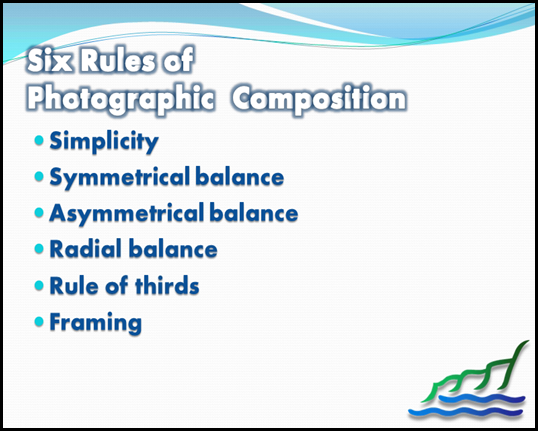
Tonight’s session was a class on Photographic Composition.  In the visual arts — in particular painting, graphic design, photography and sculpture —composition is the placement or arrangement of visual elements or ingredients in a work of art, as distinct from the subject of a work. It can also be thought of as the organization of the elements of art according to the principles of art.

The term composition means 'putting together,' and can apply to any work of art, from music to writing, that is arranged or put together using conscious thought. In the visual arts, composition is often used interchangeably with various terms such as design, form, visual ordering, or formal structure, depending on the context. In graphic design and desktop publishing, composition is commonly referred to as page layout.
image

Follow these photography tips to learn how to compose your subject in an asymmetrical fashion. Rather than simply centre-framing your subject, which can get a little boring and repetitive for both cameraman and viewer, experiment with moving your central object a little to the left or right. This creates interest and challenges you to add interest to other areas in the photograph.

The Rule of Threes

The rule of threes suggest you divide an image up into equal parts (3 parts across and 3 parts down), and that anything you wish to focus upon in the picture should be laid across the lines that divide these parts. In human photography, it is often used to centre the body and line up the person's eyes with one of the horizontal lines.

Asymmetrical composition can break the rule of thirds (by not having the person on one of the lines) or by not placing the subject in proportion to the other thirds. It can also follow the rule by placing the focus of the shoot into one third of the photograph. This asymmetrical composition draws the viewer into the picture.

Symmetry

One thing that can put a viewer off the photograph more than anything else is the use of symmetry which doesn't quite work out. If you are using symmetry, then it has to be absolutely symmetrical, or it is pointless. A deliberately asymmetrical photograph may not even be noticed by the viewer, as it looks more natural and less formally composed. Photography tips will often advise against symmetry simply due to the likelihood that complete symmetry will be missed.

Unintentional Symmetry

Along with not-quite symmetry, a common amateur mistake is to have accidental symmetry of objects in the photograph. You may, for example, take an asymmetrical photo of a child, only to notice later that they are in exactly the same angle as a power line, shadow or tree. These kinds of accidents are best avoided, as they can give a sinister and unpleasant look to what would be a simple photograph. Before taking the picture, check that there are no reflected symmetries in the background.

Harmony

Although a photograph can be asymmetrical, that doesn't mean that they are not pleasing to the eye. The Rule of Thirds helps any composition to achieve harmony: even if two parts of the picture appear empty, while the other third is 'busy', these thirds are actually working together to focus the eye. The only time that an asymmetrical photograph is not in harmony is when the subject has lent itself to a symmetrical composition. In this case, an asymmetrical picture may be jarring and alarming to the viewer. Mostly, however, photos are simply better and more entertaining when they are composed asymmetrically.

image

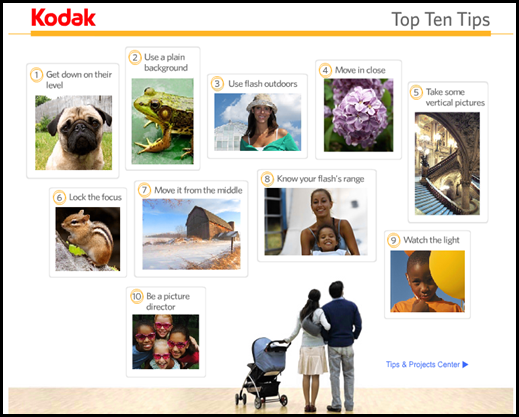
We ended the the session by looking at Kodak’s Top Ten Tips for taking great photographs.

If you’d like to see the Top Ten Tips, click here!
 

image

Wednesday, 19 January 2011

PC Maintenance Class 2: Term 2

Tonight’s session was all about Applications. We started off the class with a PowerPoint presentation all about the different types of Application that we have.  We discussed the popular applications such as Microsoft Word and Excel.

We then looked at the Windows folder structure on a Windows XP computer. I demonstrated to the group, the Windows folders, the Program Files folder and the Documents and Settings folders.  We had a good look at the subfolder section, of the Documents and Settings folder, particularly the All Users folder, and discussed how we can deliver icons to all users desktop profiles on the computer. Comparing this to how the standard user profile works.

As a practical session,  I had borrowed 6 laptops, and I had some software that we could install.  The first part of the task was to do the Windows registration. The laptops were new, and it is common procedure to complete the Windows 7 installation with some personalisation details.

After that was complete, we proceded to install two pieces of software. The first was the ever popular, Microsoft Office, and the second was a piece of software called The 2-Simple Collection.  This enabled students who hadn’t installed software, to see what options are available when you put a piece of software on the computer.


image

Tuesday, 18 January 2011

Digital Camera Class 2: Term 2

This week was a practical session where we setup a background and took a series of photographs.  We used a roll of paper draped over a chair, and rolled it out flat, so we had a neutral background. This is ideal for taking pictures where you don’t want the background to clutter the picture to distract from the subject.

The group had brought in some objects from home, and I demonstrated to the group, the advantage of using a tripod.  First though, I demonstrated the full use of the tripod, and how to get the best from one.  Using the tripod, to steady the camera, we placed several items in front of the camera, and I demonstrated to the group how to compose the shot, and showed the difference it has, when you use the flash on the subject.

The class ended on a chilly note…..literally!  We went out onto the school field, with tripods to take some pictures of the full moon, that was high in the clear starry sky! 


DSC03706

My goodness it was cold….we’ll have a look at some of those pictures on the projector screen!