Last week I brought a bag of components in and got the class to assemble the computer. We had previously priced up components, so this was a ‘sort of’ build your own session. This week I brought in another PC, and tonight’s class was to dismantle the computer, well one half of the class, and then afterwards the other half of the class would assist in reassembling it.
I think the more exposure the group gets of ‘hands on’ experience, the more comfortable they will become with dealing with the inside of the computer. Reinstalling Windows and your software is one thing, but replacing hardware is a pivotal part of PC Maintenance, and one needs to become familiar with handling hardware, otherwise you’ll end up having to get someone in, and you’ll be paying a premium in some cases. Being able to build your own PC, upgrade it, and replace components in it, will save you a fortune, and it won’t cost you the earth.

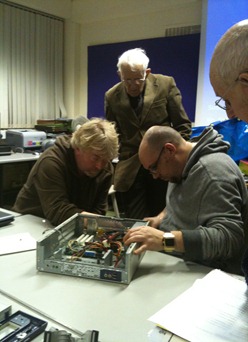
Roger doesn't quite look convinced by how Claire and Dick are dismantling the PC.
You might have an old computer, so that would be starting point. Taking it apart and if need be documenting what you are doing, will enable you to put it back together….this being the premise, this is what the plan was for tonight's session.
Dick chose to take a supervisory role in the first round, by acting as what he referred to as ‘the scribe’. He wrote meticulous notes and the procedure in which the machine was taken apart by Claire. They even placed the screws on the table next to the appropriate pieces of hardware.
Dick maintains his supervisory role, as the computer is reassembled. He was on standby to translate his notes where appropriate.
In fairness putting the computer back together is a little more complicated than taking it apart, because if things don’t go in the correct place, then the machine will not start up. There were a couple of slight hiccups along the way, but all in all everyone did a very good job.
Next week we’re going to delve back into Windows, and examine in some detail the Windows 7 and Windows XP System Properties, Control Panel Applet. So stay tuned!
|  |


%5B5%5D.jpg "Roger doesn't quite look convinced by how Claire and Dick are dismantling the PC.")
